Plagiarism Checker
Scan your text sentence by sentence against the web for matching phrases. An aid, not a definitive originality guarantee. No signup.
Share on Social Media:
This plagiarism checker scans your text sentence by sentence against the web, looking for exact-phrase matches and showing where they appear. Paste your text and tap Check. It is an aid to spot possible matches, not a definitive originality guarantee, and results should always be reviewed with judgement.
How to Check Text for Plagiarism Step by Step
- Paste your text. Paste the text you want to check into the input box. The checker works through it sentence by sentence.
- Tap Check Plagiarism. Tap the button to start the check. The tool searches the web for each sentence to look for exact-phrase matches.
- Wait for the results. The tool searches sentence by sentence, so give it a moment. A number of sentences are checked per run.
- Read the results. The tool shows how many sentences were found online and how many had no match, with the sources where matches appear.
- Review each match yourself. Open the matching sources and judge each one: a match may be a legitimate quote, a common phrase, or genuine overlap.
What the Plagiarism Checker Does and How
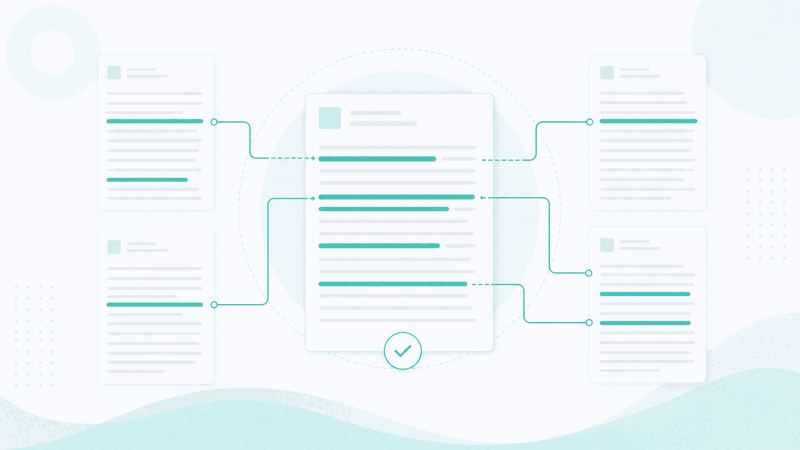
A plagiarism checker helps you find text that also appears elsewhere on the web. This tool works sentence by sentence: for each sentence, it searches the web for an exact-phrase match and shows where any matches appear. That lets you see which parts of your text also exist online, and where.
It is important to understand what this does and does not tell you. Finding a matching sentence online means that wording appears on the web; it does not by itself prove plagiarism. Matches can be legitimate quotations, common phrases, or text that others have copied from your source. So the checker is an aid to spot possible overlap, not a definitive originality guarantee.
The tool checks a number of sentences per run, so for a long document you may check it in parts. Because it searches the web live, it works best on distinctive sentences: very short or very common sentences may match widely without meaning anything, while a distinctive sentence found online is more worth reviewing.
The results are a starting point for your own review, not a verdict. For each match, you open the source and judge whether it is a quotation, a coincidence, or genuine copying. Used this way, the checker helps you catch unintentional overlap and check originality, always alongside your own judgement.
A Match Versus Proof of Plagiarism
| Result | What it shows | How to read it |
|---|---|---|
| Found online | Sentences with a web match | Worth reviewing, not proof |
| No match | Sentences with no match found | No exact match seen |
| Sources | Where matches appear | Open and judge each |
| Per run | A set number of sentences | Check long text in parts |
Who Uses a Plagiarism Checker
Pro Tips for Reviewing Matches
Common Plagiarism Checking Mistakes to Avoid
Related Tools You May Need Next
For related checks, our Text Similarity Checker compares two specific texts, the Duplicate Word Counter finds repeats within a text, and the Word Counter measures length.

Frequently Asked Questions
How does the plagiarism checker work?
It works through your text sentence by sentence. For each sentence, it searches the web for an exact-phrase match and shows where any matches appear. This lets you see which parts of your text also exist online and where. A number of sentences are checked per run, so for a long document you check it in parts. The results show how many sentences were found online, how many had no match, and the sources for the matches.
Does a match prove plagiarism?
No. Finding a sentence online means that wording appears on the web; it does not by itself prove plagiarism. A match may be a legitimate quotation, a common phrase, or text that others have copied from your own published work. That is why the tool is an aid to spot possible overlap, not a definitive originality guarantee. You should open each match and judge it yourself rather than treating a match as proof.
How many sentences does it check?
The tool checks a set number of sentences per run, because each sentence is searched against the web live. For a short piece, one run may cover it; for a longer document, you paste and check it in parts so the whole text is covered. Focusing on distinctive sentences is worthwhile, since very short or common sentences can match widely without indicating any real overlap.
Why are some sentences found and others not?
A sentence is reported as found when its exact wording appears on a web page the search reaches. Distinctive sentences that exist online are the ones most likely to be found. Very short or very common sentences may not be searched as usefully, and original sentences will usually have no match. No match found means no exact match was seen, which is a good sign but not an absolute guarantee of originality.
Is this a full originality score?
No. Rather than a single percentage that certifies originality, the tool gives you sentence-by-sentence matches to review, with their sources. This is more useful for catching specific overlap, but it means the value lies in reviewing the matches yourself, not in reading one number. Treat the results as a starting point for your own judgement about originality and attribution.
Is my text uploaded anywhere?
To check for matches, the tool searches the web for the sentences in your text, so those sentences are sent to a search backend to look for matches. This is necessary for a web-based plagiarism check. Bear this in mind for highly sensitive or confidential text, and check only what you are comfortable searching against the web.
Can I use it on my phone?
Yes. The tool runs in your browser and works the same on a phone, tablet or computer, with no app to install. Paste your text and tap Check Plagiarism, then give it a moment as it searches sentence by sentence. The results, showing matches and their sources, appear on your device, ready for you to review each one.
Is the plagiarism checker free?
Yes, it is completely free with no account and no limit on how often you check, though a set number of sentences is checked per run. The tool runs in your browser and searches the web for matches. Remember that it is an aid to spot possible overlap, not a definitive originality guarantee, so always review the matches it finds with your own judgement.